Typing speed measures how quickly you can type text on a keyboard, expressed
in Words Per Minute (WPM). One "word" is standardized as 5
characters (including spaces), so a 50 WPM typist produces 250 characters per
minute.
There are two key metrics: Gross WPM counts every character
you type, while Net WPM subtracts errors — giving you a realistic measure of
productive typing speed. Most typing tests, including ours, report Net WPM.
You'll also see CPM (Characters Per Minute) and
accuracy percentage. A high WPM with low accuracy often means you're producing
more errors than useful text. That's why professional typists prioritize 95%+
accuracy alongside speed.
💡 Quick Formula: WPM = (Total Characters Typed ÷ 5) ÷ Time in Minutes. For
example, typing 500 characters in 2 minutes = (500 ÷ 5) ÷ 2 = 50 WPM.
Typing speed typically peaks in young adulthood (19–30 years) and gradually
evolves with age. Younger typists tend to be faster but less accurate, while older adults
prioritize precision. Here's the data:
👶
5–20
Children (6–11)
WPM — Learning basics
🧑🎓
35–60
Teenagers (13–19)
WPM — Rapid growth
💼
40–80
Young Adults (19–30)
WPM — Peak potential
🏠
38–65
Adults (31–50)
WPM — Stable & accurate
👴
25–50
Seniors (65+)
WPM — High precision
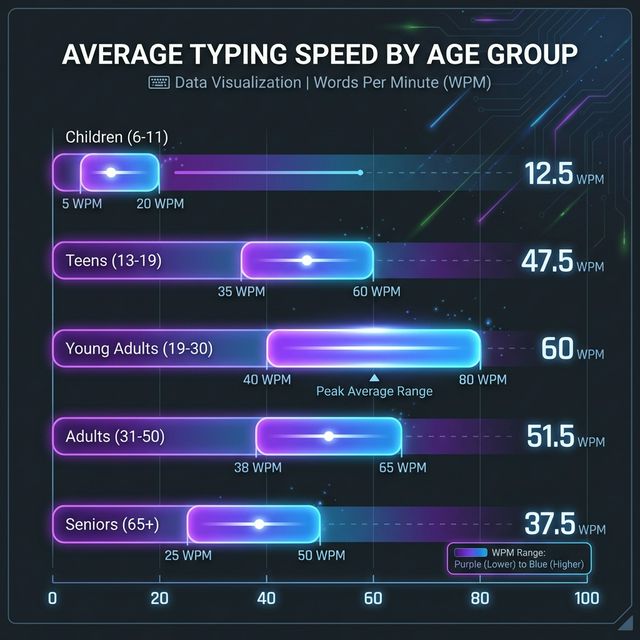
Average WPM ranges by age group — based on 2024–2025 research
data
Key Takeaway
The average adult types 40–52 WPM. If you're above 60 WPM, you're in the top
25% of all typists. Accuracy tends to improve with age, even as raw speed decreases
slightly.
Different careers demand different typing proficiencies. Here's what employers
expect across industries, so you can benchmark your skills against professional standards.
| Profession |
Required WPM |
Min. Accuracy |
Notes |
| 📝 Data Entry Specialist |
60–80 |
97%+ |
Speed-critical role |
| 🎙️ Transcriptionist |
65–100+ |
98%+ |
Medical/legal specialization |
| ⚖️ Legal Professional |
60+ |
97%+ |
Fastest industry avg (60.6 WPM) |
| ✍️ Writer / Content Creator |
60–90 |
95%+ |
Productivity multiplier |
| 💻 Programmer |
40–60 |
95%+ |
Accuracy > speed |
| 📞 Customer Support |
60–80 |
95%+ |
Chat/email response time |
| 🏢 Office Worker |
45–60 |
95%+ |
Reports & emails |
| 🏭 Manufacturing |
46+ |
90%+ |
Lowest industry avg |
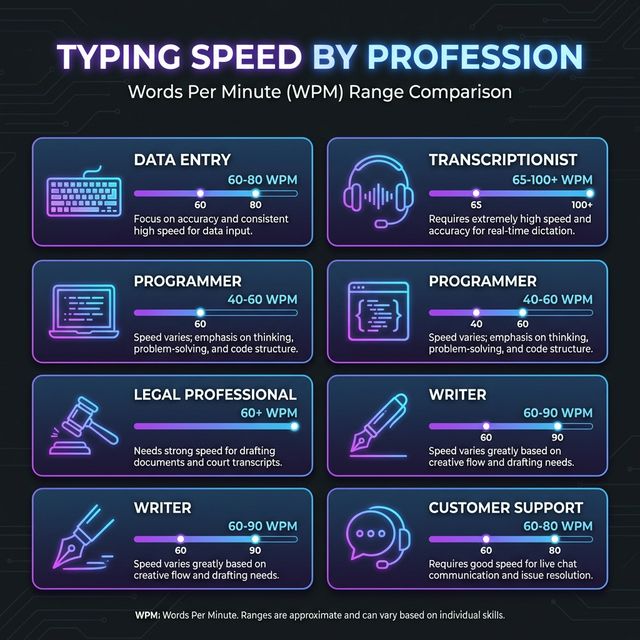
WPM requirements across industries — accuracy requirements of
95%+ are universal
Whether you're a beginner or seasoned typist, these are the most common
frustrations people face — and the expert-backed solutions to overcome each one.
👀
1. Hunt-and-Peck Typing
❌ Constantly looking at the keyboard kills speed,
breaks rhythm, and prevents muscle memory from forming.
✅ Solution: Commit to touch
typing. Use the bumps on F and J keys to orient your fingers. It feels slow at
first, but within 2 weeks of daily 15-minute practice, you'll see dramatic
improvement.
🎯
2. Poor Accuracy & Recurring Errors
❌ High error rates waste time on corrections and
make your effective WPM much lower than your gross WPM.
✅
Solution: Slow down and aim
for 95%+ accuracy. Use our typing
test heatmap to identify problem keys, then drill those specific keys
until they become automatic.
📈
3. Speed Plateau
❌ You've been stuck at the same WPM for weeks
despite regular practice. Improvement feels impossible.
✅ Solution: Improvement comes in
waves, not linearly. Mix up practice modes (quotes, words, timed), focus on
technique refinements, and push 5-10% above your comfort zone during sessions.
Rest is also crucial — your brain consolidates skills during sleep.
🤕
4. Wrist Pain & RSI
❌ Extended typing sessions cause discomfort,
fatigue, and risk of repetitive strain injury (RSI).
✅ Solution: Maintain elbows at
90°, wrists straight and floating (not resting on desk). Take 5-minute breaks
every 25 minutes. If discomfort keeps coming back, look for a keyboard and desk
setup that keeps your wrists neutral and reduces strain.
🖐️
5. Using Wrong Fingers
❌ Typing with 2-4 fingers instead of all 10
creates a hard ceiling on your maximum speed.
✅
Solution: Learn proper finger
assignments. Each finger covers specific keys from the home row outward. Use our
Learn page for the complete finger placement
guide.
⚡
6. Rushing Before You're Ready
❌ Trying to type fast before mastering accuracy
reinforces bad habits and builds incorrect muscle memory.
✅ Solution: Follow the "accuracy
first" rule. Type at a speed where you make almost zero errors, then gradually
push faster. Accurate 40 WPM beats error-prone 60 WPM in real
productivity.
📅
7. Inconsistent Practice
❌ Practicing once a week for an hour doesn't build
muscle memory. Skills atrophy between long gaps.
✅ Solution: Practice 10-15
minutes every day. Short, consistent sessions build neural pathways far more
effectively than marathon sessions. Set a daily reminder and track your
streaks.
Follow this proven roadmap to go from any starting level to professional-grade
typing. Each step builds on the previous one.
1
🪑
Fix Your Posture
Sit straight, feet flat, elbows at 90°, screen at eye level. An ergonomic chair with lumbar support
helps reduce fatigue and lets you type longer without discomfort.
2
⌨️
Master Home Row
Place fingers on ASDF JKL; — feel the bumps on F and J. This is your anchor. Always
return here after reaching for other keys.
3
🎯
Accuracy First
Type slowly and correctly. Aim for 95%+ accuracy before pushing speed. Bad habits formed
now are hard to break later.
4
📆
Practice Daily
10-15 minutes every day beats 2-hour weekly sessions. Consistency builds the neural
pathways that make typing automatic.
5
📊
Track Your Progress
Use your Profile to see WPM trends over time. Check the
keyboard heatmap to identify your weakest keys and target them.
6
🚀
Push Your Limits
Once accuracy is solid, gradually push 5-10% above your comfort zone. Try different text
modes, read ahead while typing, and type in rhythm.
💚 Pro Tip: Train your eyes to read the next word while your fingers
type the current one. This "look-ahead" technique maintains flow and can boost WPM by 10-15%
once mastered.
Many employers include a typing test as part of the hiring
process. Here's what you need to know about WPM requirements across different career paths.
💾
Data Entry
60–80 WPM
97%+ accuracy required
🎙️
Transcriptionist
65–100+ WPM
98%+ accuracy required
📞
Customer Support
60–80 WPM
95%+ accuracy required
⚖️
Legal / Paralegal
60+ WPM
97%+ accuracy required
🏥
Medical Scribe
40–70 WPM
98%+ accuracy required
🏢
Admin Assistant
50–70 WPM
95%+ accuracy required
⚠️ Important: Many job postings list a
minimum WPM, but competitive
candidates typically exceed it by 10-20 WPM. Practice with our
free typing test to get your score ready before
applying.
What is a good typing speed?
+
A "good" speed depends on context. For everyday
use, 40+ WPM is functional. For office work, aim for
50–60 WPM. Professional typists typically need 75–95 WPM. If you're
above 60 WPM with 95%+ accuracy, you're faster than 75% of all
typists.
How long does it take to learn touch typing?
+
With consistent daily practice (15
minutes/day), most people reach comfortable touch typing within 2–4
weeks. Reaching 60+ WPM typically takes 2–3 months of
dedicated practice. The key is consistency — 15 minutes daily beats 2 hours weekly.
Is 40 WPM good enough for a job?
+
40 WPM meets the minimum for most
general office positions. However, roles like data entry (60–80
WPM) and transcription (65–100+ WPM) require significantly more
speed. Even for 40 WPM minimum roles, aim for 50+ WPM to stand out
competitively.
Why does my WPM fluctuate so much?
+
WPM variation is completely normal. Factors include
fatigue (speed drops after 20+ minutes), text
difficulty (uncommon words slow you down), time of day
(most people peak mid-morning), and keyboard familiarity. Track
your average over multiple tests rather than fixating on single results.
Should I focus on speed or accuracy first?
+
Always accuracy first. Typing 40 WPM
with 98% accuracy is more productive than 60 WPM with 85% accuracy (the corrections
eat up all the "extra" speed). Once you consistently hit 95%+ accuracy, then start
pushing for more speed. This approach builds correct muscle memory from the start.
What's the fastest typing speed ever recorded?
+
The fastest typing speed recorded is 216
WPM, achieved by Stella Pajunas in 1946 on an IBM electric typewriter.
In modern tests, competitive typists regularly achieve 150-180 WPM
on platforms like TypeRacer. The world's fastest typists train for years and have
exceptional muscle memory.
Do mechanical keyboards help you type faster?
+
Mechanical keyboards can improve typing
comfort and provide better tactile feedback, which may indirectly boost
speed. Popular picks include the Keychron C3 Pro (budget) and Keychron K8 Pro (mid-range).
However, the keyboard matters less than technique and
practice. A skilled touch typist on a basic keyboard will outperform a
hunt-and-peck typist on a premium mechanical keyboard every time.
How can I test my keyboard is working properly?
+
Use our free
Keyboard Tester tool to verify
every key on your keyboard registers correctly. It shows a visual keyboard where
each key lights up as you press it, helping you identify any malfunctioning or
unresponsive keys.
Ready to Boost Your WPM?
Apply what you've learned — take a typing test now and start tracking your improvement journey!