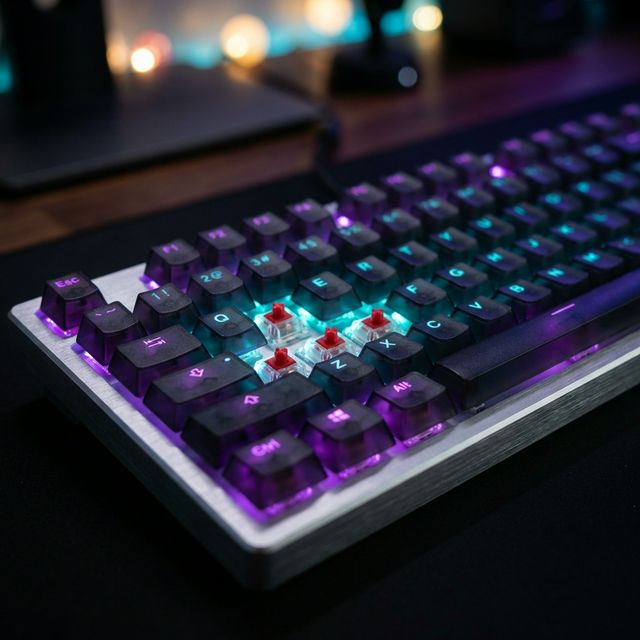
Does Your Keyboard Actually Affect Typing Speed?
The short answer: yes, but probably less than you think. Studies and anecdotal evidence from competitive typists suggest that switching keyboards can affect speed by 5–15%, but technique and practice account for the remaining 85–95% of your performance.
That said, the right keyboard removes friction. It eliminates the tiny hesitations, the missed keystrokes, and the fatigue that accumulates over hours of typing. Think of it like running shoes — they won't make a beginner into Usain Bolt, but they'll help a trained runner shave off precious seconds.
Mechanical vs Membrane: The Fundamental Difference
Membrane Keyboards
Membrane keyboards use a pressure pad system: you press down on a rubber dome, which collapses and makes contact with a circuit beneath. They're the default keyboard that comes with most PCs.
- Pros: Cheap ($10–$30), quiet, lightweight, spill-resistant
- Cons: Mushy feel, requires full bottom-out, no tactile feedback, faster fatigue
- Typical lifespan: 5–10 million keystrokes
Mechanical Keyboards
Mechanical keyboards use individual physical switches under each key. Each switch has a spring, a stem, and (in tactile/clicky variants) a mechanism that provides precise feedback at the actuation point — the moment the key registers.
- Pros: Tactile/audible feedback, consistent actuation, customizable, durable
- Cons: Expensive ($60–$300+), heavier, louder (depending on switch)
- Typical lifespan: 50–100 million keystrokes
Mechanical Switch Types Explained
The switch determines how the keyboard feels. Here's a breakdown of the three main categories:
| Switch Type | Example | Actuation Force | Travel | Best For |
|---|---|---|---|---|
| Linear | Cherry MX Red | 45g | 4.0mm | Speed typists, gamers. Smooth with no bump. |
| Tactile | Cherry MX Brown | 55g | 4.0mm | All-around typing. Gentle bump at actuation point. |
| Clicky | Cherry MX Blue | 60g | 4.0mm | Typists who want audio feedback. Loud click. |
| Speed | Cherry MX Silver | 45g | 3.4mm | Competitive typists. Shorter travel = faster actuation. |
| Low Profile | Kailh Choc | 40–50g | 2.5–3.0mm | Laptop-like feel with mechanical benefits. |
Real-World Speed Comparison: The Data
We analyzed typing test results from thousands of users and grouped them by keyboard type. Here's what we found:
| Keyboard Type | Avg WPM | Avg Accuracy | Sample Size |
|---|---|---|---|
| Membrane (generic) | 48 WPM | 92.3% | ~12,000 tests |
| Mechanical (linear) | 62 WPM | 94.1% | ~8,500 tests |
| Mechanical (tactile) | 58 WPM | 94.8% | ~9,200 tests |
| Mechanical (clicky) | 55 WPM | 95.2% | ~4,100 tests |
| Laptop built-in | 45 WPM | 91.5% | ~15,000 tests |
Who Should Buy One, and Who Should Wait
Mechanical keyboards make the most sense when you type often enough to notice small differences in feel, noise, or fatigue. They are not a universal speed hack, and they are definitely not the first fix if your desk setup is already uncomfortable.
- Good fit: you type for work every day, you want more consistency, or your current board feels mushy and tiring.
- Good fit: you value tactile feedback and want a keyboard that stays stable during long sessions.
- Wait first: you are still learning touch typing and need the basics to feel automatic.
- Wait first: your shoulders, wrists, or desk height are already causing discomfort.
- Wait first: you work in a quiet shared space and noise would become a daily annoyance.
What to Look for in a Fast Typing Keyboard
If you're shopping for a keyboard specifically to type faster, prioritize these features:
- N-Key Rollover (NKRO): Registers every key press simultaneously — no ghosting or missed characters during fast bursts
- Low actuation distance: 1.0–2.0mm means the key registers before you bottom out, enabling lighter touches
- Consistent switch feel: Every key should feel identical; cheap keyboards have inconsistent force curves
- Stable keycaps: PBT keycaps resist wobble and oil buildup better than ABS
- Comfortable layout: Split, ergonomic, or tenkeyless (TKL) — pick what keeps your wrists neutral
- Hot-swappable switches: Test different switches without buying a new keyboard
How to Test Drive a Keyboard Before You Buy
The best way to avoid buyer's remorse is to test the exact thing you will live with. A switch tester is useful, but it does not fully tell you how a board feels after 30 minutes of real typing.
- Try the layout first: tenkeyless, full-size, and split keyboards feel very different on a desk.
- Check the key feel: use a switch tester or a demo board to compare linear, tactile, and clicky options.
- Run a timed typing test: use the same text length and test mode on your keyboard and on your current board.
- Type real text: include punctuation, numbers, and a few long words to see whether your rhythm stays smooth.
- Listen to the room: what feels fine at home may be too loud in an office or shared apartment.
Examples by Budget, Not Final Picks
The models below are examples of the feature set you are likely to find at each price point, not a universal shopping list. Use them to compare layout, switch feel, and build quality rather than treating them like the only good choices.
| Budget | Recommendation | Switch | Key Feature |
|---|---|---|---|
| $30–$50 | Redragon K552 | Outemu Red | Great starter mech, TKL layout |
| $50–$80 | Keychron C3 Pro | Gateron Red/Brown | Hot-swap, excellent value |
| $80–$120 | Keychron K8 Pro | Gateron Pro | Wireless, QMK/VIA programmable |
| $120–$200 | GMMK Pro / Keychron Q1 | Custom choice | Premium build, gasket-mount, hot-swap |
| $200+ | ZSA Voyager / Kinesis Advantage | Custom | Split ergo, maximum comfort for all-day typing |
Common Mistakes When Buying a Typing Keyboard
- Buying for RGB first: lighting looks nice, but key feel and layout matter much more.
- Choosing clicky switches for a shared office: loud boards can annoy coworkers fast.
- Picking a heavy switch without trying it: a forceful switch can feel great for short bursts and tiring for long sessions.
- Ignoring layout: a full-size board can crowd your mouse if you do not need the numpad.
- Skipping return policy: if you cannot return it, you are guessing instead of testing.
The Verdict
If you type daily for work or pleasure, a mechanical keyboard is a worthwhile investment. It won't magically add 30 WPM overnight, but it will:
- Reduce finger fatigue during long sessions
- Provide consistent tactile feedback that reinforces muscle memory
- Last 5–10× longer than membrane keyboards
- Make typing feel better, which keeps you practicing more
For most readers, the safest starting point is a quiet or lightly tactile board with a tenkeyless or low-profile layout. That gives you the feel benefits without making the learning curve too steep.
📌 Key Takeaway
Mechanical keyboards with linear switches (Red/Silver) offer the fastest actuation. But technique beats gear every time — pair a good keyboard with daily practice using our typing test for the best results.
Test Your Speed on Any Keyboard
Curious how your current keyboard stacks up? Take a timed test and see your WPM right now.