Why Typing Ergonomics Matter
Many office and remote workers spend several hours a day at a keyboard. That repetitive load can leave your fingers, wrists, shoulders, and neck feeling worn down over time. Repetitive Strain Injury (RSI) is a broad term for overuse problems such as carpal tunnel syndrome, tendon irritation, and trigger finger.
The uncomfortable part is that strain often builds slowly. Small warning signs are easy to ignore until they start showing up every day. The good news? Many typing-related issues are preventable with a better setup and a few consistent habits.
Start With the Simplest Fixes
Before you buy new gear, check the basics. Most typing discomfort comes from a setup that is too high, too far away, or too tense.
- Keep the keyboard close: reaching forward pulls your shoulders into a tiring position.
- Relax the shoulders first: if they are raised, your wrists usually follow.
- Use lighter keystrokes: typing does not need heavy force.
- Break before the ache builds: short pauses work better than one long break after you already feel sore.
The Perfect Typing Posture
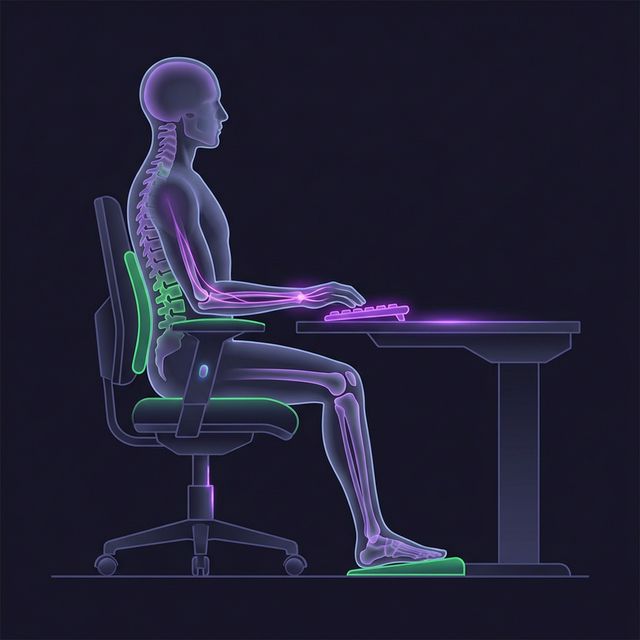
Correct posture is the foundation of pain-free typing. Here's the ideal setup from head to toe:
- Head: Level gaze at the top third of your screen. No craning forward.
- Shoulders: Relaxed and dropped, not hunched up toward your ears
- Elbows: Bent at 90–110°, close to your body, resting naturally
- Wrists: Neutral position — not bent up, down, or sideways. Floating above the keyboard, not resting on a wrist rest while actively typing
- Fingers: Gently curved, hovering over home row. Minimal force per keystroke
- Hips: At 90–100° angle, back supported by chair
- Feet: Flat on the floor (or footrest). Thighs parallel to the ground
A 60-Second Desk Reset
Run this quick check whenever you sit down or notice tension building:
- Sit back and plant your feet.
- Pull the keyboard close enough that your elbows stay near your sides.
- Check that your wrists are straight, not bent upward.
- Type a short sentence slowly and notice whether your shoulders creep up.
- If tension returns immediately, change the setup again instead of pushing through.
Essential Ergonomic Equipment
You do not need a complete ergonomic overhaul to feel better. Start with the keyboard position, the chair height, and the mouse distance. Hardware matters, but it helps most when it solves an actual problem you can feel.
Keyboards
| Type | Best For | Price Range | Key Benefit |
|---|---|---|---|
| Split keyboard | All-day typists | $80–$400 | Natural hand angle, reduced ulnar deviation |
| Ergonomic curved | Moderate typists | $40–$150 | Gentler learning curve than split |
| Tented keyboard | Wrist pain sufferers | $100–$400 | Reduces pronation (wrist rotation) |
| Low-profile mechanical | Speed + comfort | $80–$200 | Lower key travel = less finger extension |
Desk & Chair
- Desk height: 28–30 inches for most people (adjustable standing desk ideal)
- Chair: Adjustable seat height, lumbar support, armrests at keyboard height
- Monitor: Arm's length away, top of screen at eye level. Use a monitor arm if needed
- Mouse: Close to the keyboard. Consider a vertical mouse or trackball
5-Minute Typing Fitness Routine
Do these exercises every 45–60 minutes of continuous typing. They take less than 5 minutes:
1. Wrist Circles (30 seconds)
Extend your arms straight out. Make slow circles with your wrists — 10 clockwise, 10 counter-clockwise. This increases blood flow to the carpal tunnel area.
2. Finger Stretches (30 seconds)
Spread your fingers as wide as possible, hold for 5 seconds. Then make a tight fist, hold for 5 seconds. Repeat 5 times. This resets the flexor and extensor tendons.
3. Prayer Stretch (30 seconds)
Press your palms together in front of your chest (prayer position). Slowly lower your hands toward your waist while keeping palms pressed together, until you feel a stretch in your forearms. Hold for 15 seconds.
4. Forearm Stretch (30 seconds each arm)
Extend one arm straight, palm up. Use the other hand to gently pull your fingers down and back toward your body. Hold for 15 seconds per arm. This stretches the wrist flexors.
5. Shoulder Rolls (30 seconds)
Roll your shoulders backward in slow, large circles — 10 times. This releases tension that accumulates from hunched typing posture.
6. Stop-and-Reset Rule (30 seconds)
If you catch yourself hunching, clenching, or pressing too hard, stop for half a minute. Open your hands, drop your shoulders, breathe out, and restart gently. Catching tension early is easier than undoing a full hour of bad posture.
📌 The 20-20-20 Rule
Every 20 minutes, look at something 20 feet away for 20 seconds. This prevents eye strain and naturally creates micro-breaks in your typing rhythm.
Daily Habits for Long-Term Health
- Take micro-breaks: 30 seconds every 20 minutes, 5 minutes every hour
- Alternate tasks: Switch between typing, reading, and meetings to vary hand position
- Type lighter: You only need ~55g of force to press most keys — don't bottom out aggressively
- Use keyboard shortcuts: Copy/paste, undo, and navigation shortcuts reduce total keystrokes by 20–30%
- Stay hydrated: Dehydration stiffens tendons and increases friction in the carpal tunnel
- Strengthen your core: A strong core maintains proper posture effortlessly over long hours
- Do not type through pain: If a movement makes symptoms worse, stop and adjust the setup instead of trying to push through it
- Use shortcuts and dictation: For repetitive text, reduce the number of keystrokes whenever you can
When to See a Doctor
Self-correction helps with prevention, but symptoms that persist or worsen deserve a professional opinion. Get checked if:
- Pain that persists after you stop typing
- Numbness or tingling that wakes you up at night
- Weakness in your grip (dropping objects)
- Visible swelling in your wrists or fingers
- Pain that doesn't improve after 2 weeks of ergonomic changes
Type Smarter, Not Harder
Pair ergonomic habits with touch typing technique for maximum comfort and speed.